How To Create Free Blog On Blogger

Creating of blog is simplest and the easiest so ever, but not knowing what it all about is the biggest problem to know about blogging click on this How To Start Blogging
Moreover we have many platform that we can use in creation of blog but here i will be teaching you how to use Blogger to create your own Blog
Let move on but before that let me ask a few questions
Have you dreamt of being a blogger?
Do you know how to create it?
Have you known what you want to blog about?
Do you know the name to give your blog?
Do you have passion for it?
Well if you don't know the answers to give to those questions visit the link above but if you have answers to it let move on to how we can create it.
Let get start to create blog you need the following Gmail, blog title which is same as blog name, please think of blog name before adding it, when you don't you end up changing it and go through stress.
1. Go to Google and click blogger.com on your url or click this blogger.com
2. You will be redirect to a page you will see this.
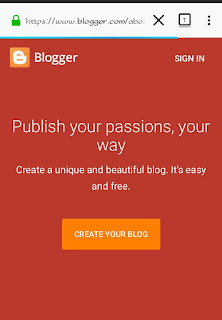
3. Click on 'CREATE YOUR BLOG'
4. Then sign in your mail

5. Insert the following your blog name and address, show a better template that you love then click create blog.
 Your blog is ready, you can see it easy. Comment and subscribe to get more post on blogging.
Moreover we have many platform that we can use in creation of blog but here i will be teaching you how to use Blogger to create your own Blog
Let move on but before that let me ask a few questions
Have you dreamt of being a blogger?
Do you know how to create it?
Have you known what you want to blog about?
Do you know the name to give your blog?
Do you have passion for it?
Well if you don't know the answers to give to those questions visit the link above but if you have answers to it let move on to how we can create it.
I said in a post blogging is unlike having fun, am sure when you share ideas with people physical you like it?
That why I called it fun, blogging is about sharing those ideas online and earn from it.Let get start to create blog you need the following Gmail, blog title which is same as blog name, please think of blog name before adding it, when you don't you end up changing it and go through stress.
1. Go to Google and click blogger.com on your url or click this blogger.com
2. You will be redirect to a page you will see this.

3. Click on 'CREATE YOUR BLOG'
4. Then sign in your mail

5. Insert the following your blog name and address, show a better template that you love then click create blog.

How to create your own blog
ReplyDelete