
How To Add Gadget To Blog On Blogger

How To Add Gadget To Blog On Blogger

add gadget to blog on lady typing on laptop

Making your blog look good should be your number choice, when your blog look good it will attract and call customer attention, knowing how to beautify blog and make it look professional is a great idea also it good to know how to add your gadgets to blog. Don't worry HELPSUIT always got your back.


What Are Gadget On Blog

We have up to 26 gadget on blogger, which you can use to classify your contents, some gadget on blog include label, contact form, popular post, recent post, archiver, subscribe form, feature post, and others

All these gadget have their own uses(continue reading to see uses), but nerve the less as quickly introduce how you can add gadget to your blog, like I said, it help you organise your blog in a well arranged manner 

Add Gadget To Blog

Including gadget to blog is one if the easiest arrangement on blog, all it requires is steps and what you have to do is this

 1. Go to "www.blogger.com" , "sign-in" your blogger account

 2. Choose your prefer blog, by clicking on your blog name on the top left
  
 3. After that, head to your "layout" which is located at the left side of your blog board, see picture below

 4. On your layout, pick "add a gadget" on the place you want your content to display,

 5. Then all the 26 gadget will display, pick the one you want by clicking on the "blue (+)" , then "save arrangement"
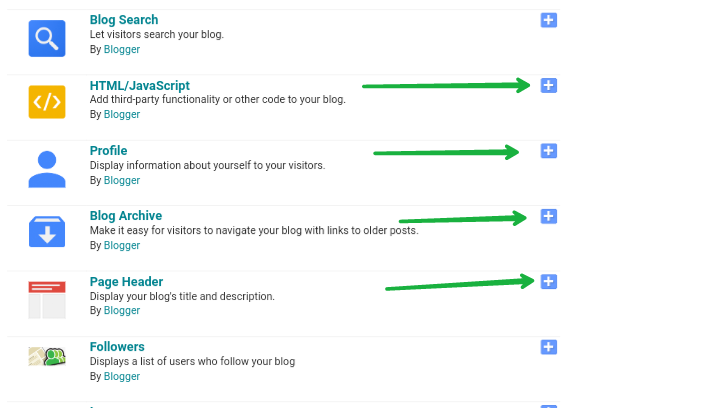
 6. You have successfully add a gadget to your blog 

Note: If the gadget you want to add is not on the screen, just click on the HTML/JavaScript, then add your html code, click save to complete your work 


Hope have help you done some arrangement on you blog, read more post to develop your blog, also remember to subscribe to our page to get updates directly to your email inbox.


Comments

Post a Comment

Popular Posts

How To Add Extra Widget To Blogger Header And Footer

How To Add Extra Widget To Blogger Header And Footer  Blogger is one of the popular blogging platform, which is used mostly by newbies, blogger accept the use of external template and more others interesting features but the painful thing about blogger is you can go against laid down rules not like the other self-hosted platforms Well HELPSUIT  is not here to tell you what blogger is all about nor tell the way it helps, we are here to give you a well designed lecture on how to add extra widget to blogger header and footer Most time, you may want to add new gadget on their layout, but unfortunately you find out you have exhausted the widget add to the layout, am sure it a bit confusing (widget & gadget), most people think of it to be the same but whatever name you give to it, do not mix the up. Do you know their is different between widget & gadget? There is a lot different between them, widget is the space/layout you put in your gadgets, while gadge...

What Should I Blog About

What Should I Blog About Are you a blogger finding it difficult to put in writing on your blog?  Do you even know want to write or blog on?  Do you know what blogging is all about?  Have you given answers to the above questions? Let give you a tip on what a blog is What Is A Blog Blog is the sharing of one's ideas and knowledge through the employment of Internet, that is sharing of one's own ideas and opinions. First thing to do as a beginner is to think on what to blog on, this is the very first important thing to do as a beginner you have to know what you want to blog on so you would be encouraged to write more article. For example I as a blogger blog on Phone(software and hardware), business development and blog mentoring because I know more about this things. I know it difficult for beginners to understand what to blog on, that why am giving this text out, for a beginner to beat this challenge. Below are what to be considered Thing...

How To Redirect Posts/Pages Url On Blogger

How To Redirect Posts/Pages Url On Blogger Today, HELPSUIT is taking you on a ride on how to redirect posts or pages url on blogger. Sometimes, beginners find it difficult to correct their mistake, some looks for solution but the problem still reoccur they decide to copy the information from the post, then create a new post and paste the content in it. Then they delete the old one thinking they have successfully solve the problem Do you know what you just did is wrong? Deleting old post and not doing the right is very wrong, to prove it wrong, use  plagiarism checkers  to know if it detect as stolen content (copy and paste). Well all we are saying is this, you don't need to delete you publish post because of minor errors, you can easily redirect your audience to a new url be it temporary or permanent Some errors that may be committed Sure, you have reason for wanting to delete a post, I guess this might be one of the reason Incorrect permalink 404 me...